Transit Services
Convenient Curb-to-Curb Service
Harbor Transit’s primary service is providing curb-to-curb transportation for our community members in the City of Ferrysburg, City of Grand Haven, Grand Haven Township, Village of Spring Lake, and Spring Lake Township. Our service area covers 55 square miles, and we serve more than 250,000 riders every year. Harbor Transit is here to help you get where you need to go, whether that’s work, school, a doctor’s appointment or even to the theatre or grocery store.
Fillmore Campus
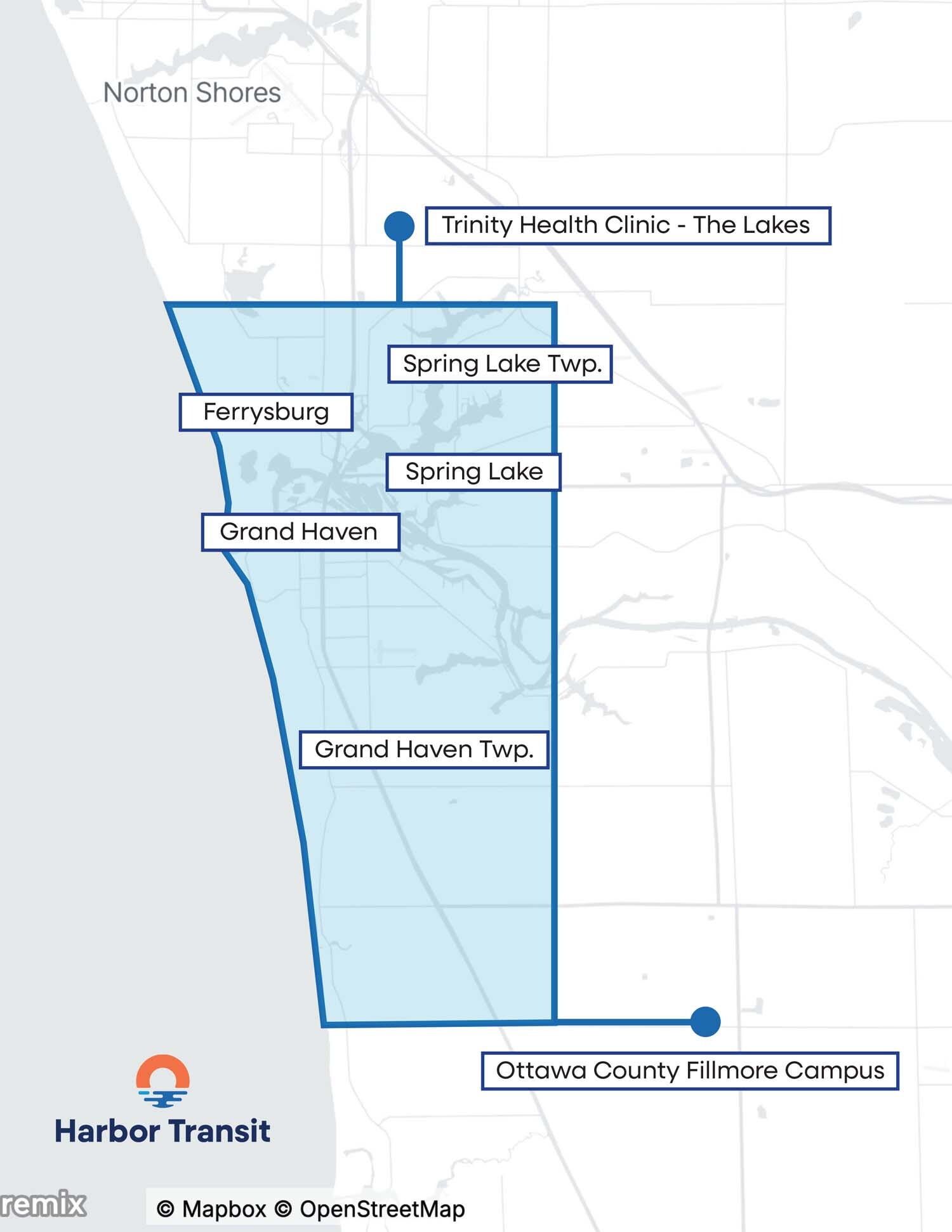
Harbor Transit is launching a two-year pilot program, beginning on July 1, 2026, to extend service to the Ottawa County Fillmore Campus in West Olive, improving access for individuals who do not have reliable ways to reach critical appointments and government services. For the first six months of the program, Harbor Transit will offer free rides to and from the Fillmore Campus, through December 31, 2026.
Fares
Providing Affordable, Convenient Service
Harbor Transit is dedicated to providing affordable, convenient curb-to-curb transportation for our community members in the City of Ferrysburg, City of Grand Haven, Grand Haven Township, Village of Spring Lake, and Spring Lake Township. We work hard to keep costs down, ensuring everyone has access to our transportation system.
Passenger Fares
| Passenger Category | Cost |
|---|---|
Full Fare
| $1.50 per ride |
Discounted Fare
| $0.75 per ride |
| Children under 4 years old | FREE with paying adult (limit 2 free child riders) |
| Monthly Pass (Full Fare Passengers) | $50 per month |
| Monthly Pass (Discounted Fare Passengers) | $25 per month |
How To Ride
How To Ride
There are two ways to ride Harbor Transit. Here’s what you need to know to set up and schedule your first ride.
Call our Ride Line
- Call our ride line: Call Harbor Transit’s dispatch center at 616-842-3200 during our operating hours to schedule your ride over the phone.
- Schedule your ride: Tell your dispatcher your pick up and drop off locations and desired arrival or departure time, and the dispatcher will give you the available ride options to choose from.
If you need a ride to work or a medical appointment and need to arrive at a specific time, we recommend calling at least 24 hours in advance so that you can choose your preferred ride time. - Wait for your bus: When you schedule your ride, you will be given a 30-minute pick up window. Your bus will arrive at your pick-up location sometime within that 30-minute window. You will also receive text message updates to the phone number on file when your bus is a few minutes away from your pick-up location.
- Pay your fare: You can purchase ride credits at the Harbor Transit facility using cash, check or card.
Use the Lakeshore Go App
- Get the app: Download the Lakeshore Go mobile app and follow the simple sign-up steps to log in to your account.
- Schedule your ride: Choose your pick up and drop off locations, your desired arrival or departure time, then choose the ride option that works best for you. You can schedule a ride up to 14 days in advance.
If you need a ride to work or a medical appointment and need to arrive at a specific time, we recommend booking your ride at least 24 hours in advance so that you can choose your preferred ride time. - Wait for your bus: Once your ride is confirmed, you will be able to track your bus right from the Lakeshore Go app. You will also receive text updates when your bus is a few minutes away from your pick up location.
- Pay your fare: You can add a payment method to the Lakeshore Go app or purchase ride credits at the Harbor Transit facility.
Hours
| Day | Transit Hours | Lobby Hours |
|---|---|---|
| Sunday | 8:00am – 12:30pm | Closed |
| Monday | 6:00am – 5:30pm | 9:00am – 5:00pm |
| Tuesday | 6:00am – 5:30pm | 9:00am – 5:00pm |
| Wednesday | 6:00am – 5:30pm | 9:00am – 5:00pm |
| Thursday | 6:00am – 5:30pm | 9:00am – 5:00pm |
| Friday | 6:00am – 5:30pm | 9:00am – 5:00pm |
| Saturday | 9:00am – 3:30pm | Closed |
Map
Coverage Map
Harbor Transit provides curb-to-curb transportation, delivering you directly to your destination. Our service area includes the City of Ferrysburg, City of Grand Haven, Grand Haven Township, Village of Spring Lake, and Spring Lake Township. To see if your pick-up location or destination is included in our service area, please take a look at the coverage map.
Harbor Transit also shares a stop with Muskegon Area Transportation System (MATS) at Trinity Health @ The Lakes in Norton Shores.
Bike Rack
Using The Bike Racks
Every Harbor Transit bus is equipped with a bike rack on the front of the bus. These racks hold two bicycles, are free to use, and are available on a first-come, first-served basis. Not sure how to use the bike racks? No problem! Follow these steps for loading and unloading your bike:
Loading Your Bike
01. Prepare Your Bike
Before loading, remove water bottles, pumps and other loose items that could fall off while the bus is in motion.
02. Inform the Driver
Inform the driver that you will be loading your bike. You must load your bike from the curb or in front of the bus.
03. Release Bike Rack
Using one hand, squeeze handle up to release latch and pull down the bike rack. Do not lean your bike against the bus.
04. Place Bike on Rack
Lift bike onto the bike rack and fit wheels into labeled wheel slots. Each wheel slot is clearly labeled for the front wheel.
05. Use Support Arm
For additional support, raise the Support Arm up and over the front wheel so the hook rests at the highest point of the front wheel.
06. Board the Transit
Board the bus and choose a seat allowing you to keep an eye on your bike. DON’T FORGET YOUR BIKE when you get off.
Unloading Your Bike
01. Inform the Driver
Inform the driver that you will be unloading your bike. Unload your bike from the curb or in front of the bus.
02. Raise Support Arm
Raise the Support Arm off the front wheel, then fold the Support Arm down to a secured position.
03. Remove Your Bike
Lift your bike and remove from it rack. Squeeze handle and fold up bick rack until it locks in place, then you are free to go!
Accessible Transit